
Professional authority is built on high-signal insights, not on chasing the latest viral dance trend. You've likely spent hours scrubbing through a two-hour keynote or webinar just to find one minute of brilliance. It's frustrating when generic AI tools return clips with neon captions that look more like a teenager's gaming channel than an executive's profile. Maintaining your digital reputation shouldn't feel like a compromise between modern video trends and professional standards.
This guide shows you how to use a professional long video to clips converter to reclaim your schedule. You'll discover how to transform long-form executive content into high-impact LinkedIn clips that build authority without the manual editing grind. We'll explore a streamlined workflow that turns your existing video assets into a consistent, high-authority LinkedIn presence. By the end of this guide, you'll have a clear path to driving executive engagement while keeping your focus on core business strategy. It's time to stop editing and start leading.
Key Takeaways
- Transition from possessing passive expertise to distributing active authority through a strategic content framework designed for LinkedIn.
- Understand how a sophisticated long video to clips converter utilizes natural language processing to isolate high-signal professional moments from long-form recordings.
- Differentiate your executive brand by prioritizing polished, high-signal content over generic "viral" trends that can undermine professional reputation.
- Master a streamlined four-step workflow that automates the extraction of professional segments from keynotes, podcasts, and webinars.
- Leverage AI as a silent partner to achieve consistent digital presence and drive high-level engagement without increasing your manual workload.
The Strategic Shift: Why Executives Need a Long Video to Clips Converter
B2B leadership is no longer just about internal decision-making; it's about visible, external expertise. Most leaders face what we call the "Content Paradox." You possess deep industry knowledge often shared in hour-long webinars, board presentations, or podcasts, yet you lack the time to distribute those insights effectively. A professional long video to clips converter acts as a strategic bridge. It shifts the organizational focus from the exhausting cycle of "Content Creation" to a high-efficiency "Content Repurposing" model. Instead of producing new assets from scratch, you can extract the most potent moments from existing recordings to maintain a consistent market presence.
Traditional horizontal formats, while excellent for deep-dive education, often fail to capture attention on mobile-first feeds. A full-length webinar doesn't stop the scroll. By transforming these assets into vertical clips, you transform a single event into a month of high-authority touchpoints. This isn't just a technical change; it's a strategic play to maximize the ROI of every minute you spend on camera.
The LinkedIn Video Advantage in 2026
LinkedIn's algorithm in 2026 prioritizes native video content more than ever. Native video generates up to two times more engagement than text-only posts, making it the most effective medium for discovery. Vertical formats are receiving a specific distribution boost, as they occupy more screen real estate on mobile devices. This format humanizes corporate leadership. It allows your network to see the nuance in your delivery and the conviction in your voice, building trust through authentic, insight-driven interactions. Moving beyond the "static post" to dynamic video ensures your professional reputation is built on high-signal moments that resonate with other decision-makers.
Overcoming the Manual Editing Bottleneck
The transition to video often stalls at the production phase. Traditional video editing workflows are notoriously slow and expensive, often requiring dedicated staff or high-priced agencies. For a busy executive team, spending hours scrubbing through timelines for a 60-second clip represents a massive opportunity cost. While many "good enough" AI tools promise speed, they often produce generic, low-quality results that can undermine brand authority. Professional-grade long video to clips converter technology serves as a silent partner. It automates the selection process with precision, identifying professional insights that align with your brand's voice. This level of effortless mastery ensures that your digital presence scales without draining your core business resources.
The Mechanics of Intelligence: How AI Identifies High-Signal Professional Moments
High-level AI doesn't just cut video; it understands it. A professional long video to clips converter uses Natural Language Processing (NLP) to parse the structure of professional speech. It recognizes the difference between a speaker's opening pleasantries and a definitive strategic insight. By analyzing semantic patterns, the technology isolates the core value proposition of your talk, ensuring that the most impactful moments are preserved for your audience.
Semantic Analysis vs. Simple Pacing
Traditional tools often rely on volume spikes or rapid scene changes to identify "interesting" moments. This approach fails executives because high-value insights are often delivered with calm, measured authority. AI-driven semantic analysis identifies thesis statements, key takeaways, and actionable advice based on context rather than just energy levels. High-Signal AI Selection is the future of B2B content. This ensures that the resulting clips preserve the intellectual integrity of your original presentation. If you want to see this precision in action, you can explore how LinkedIn-ready video clips are curated automatically.
The Art of the Professional Reframe
Converting a 16:9 horizontal interview into a 9:16 vertical format presents significant technical challenges. Simple center-cropping often cuts off speakers or misses gestural cues that convey authority. Advanced converters use facial recognition and speaker tracking to keep the subject perfectly centered, even if they move within the original frame. This maintains your executive presence throughout the clip without requiring manual adjustments or tedious keyframing.
Accuracy in automated captioning is non-negotiable for executive branding. A single typo in a technical term can undermine your credibility. High-tier converters provide refined, professional captions that respect industry-specific terminology. Additionally, the software accounts for LinkedIn "Safe Zones." It places captions and visual elements where they won't be obscured by the platform's user interface, such as the like buttons or the profile overlay. This attention to detail ensures a polished, refined end product that is ready for immediate distribution. The result is a streamlined workflow that delivers high-signal content with effortless mastery.
Viral Entertainment vs. Executive Authority: Evaluating Your Options
The distinction between vanity metrics and professional influence is critical when selecting a long video to clips converter. Most consumer-grade tools are engineered for the "attention economy" of TikTok or Instagram, where success is measured by raw view counts and rapid-fire engagement. For the B2B executive, success is defined by authority, trust, and the quality of the professional network. Using "viral" features like neon emojis, aggressive sound effects, or flashing captions can inadvertently signal a lack of seriousness, potentially eroding the digital reputation you've spent years building.
A professional-technical register requires a tool that prioritizes the speaker's insight over visual noise. When an AI tool forces a "viral" aesthetic onto a strategic keynote, it creates a brand disconnect. Your audience on LinkedIn isn't looking for entertainment; they're looking for high-signal insights that solve complex business problems. Choosing a converter that understands this distinction is the first step toward building a refined digital presence.
Feature Audit: What Actually Matters for B2B?
A strategic tool focuses on the substance of the insight rather than the spectacle of the edit. While many platforms offer manual "Word doc" style editing, this still requires you or your team to invest significant time in the selection process. A professional solution prioritizes automated content selection that recognizes the nuances of executive branding. It ensures that your LinkedIn presence remains polished, utilizing caption styles that align with corporate aesthetics rather than influencer trends.
- Contextual Accuracy: The AI must understand industry-specific terminology to provide error-free subtitles that maintain your credibility.
- LinkedIn Optimization: Visual layouts must respect the platform's specific UI constraints to avoid obscured content or awkward cropping.
- Strategic Efficiency: The workflow should move from "Action-to-Outcome" with minimal manual intervention, respecting the limited time of your leadership team.
Beware the allure of "multi-platform" distribution features. Tools that attempt to cater to every social media algorithm often fail to optimize for any single one. By focusing strictly on the LinkedIn ecosystem, you ensure your content is tailored for a professional audience that values depth over distraction.
The Security and Privacy Standard
Executives often work with sensitive material, including internal strategy calls, unreleased keynotes, or private interviews. Entrusting this data to free web tools or unverified apps presents a significant security risk. A professional SaaS platform offers the robust data protection and privacy standards required by modern corporate governance. Choosing a sophisticated partner means your intellectual property is handled with the same level of care as your digital reputation. It’s not just about the output; it's about the reliability and integrity of the process that produces it.
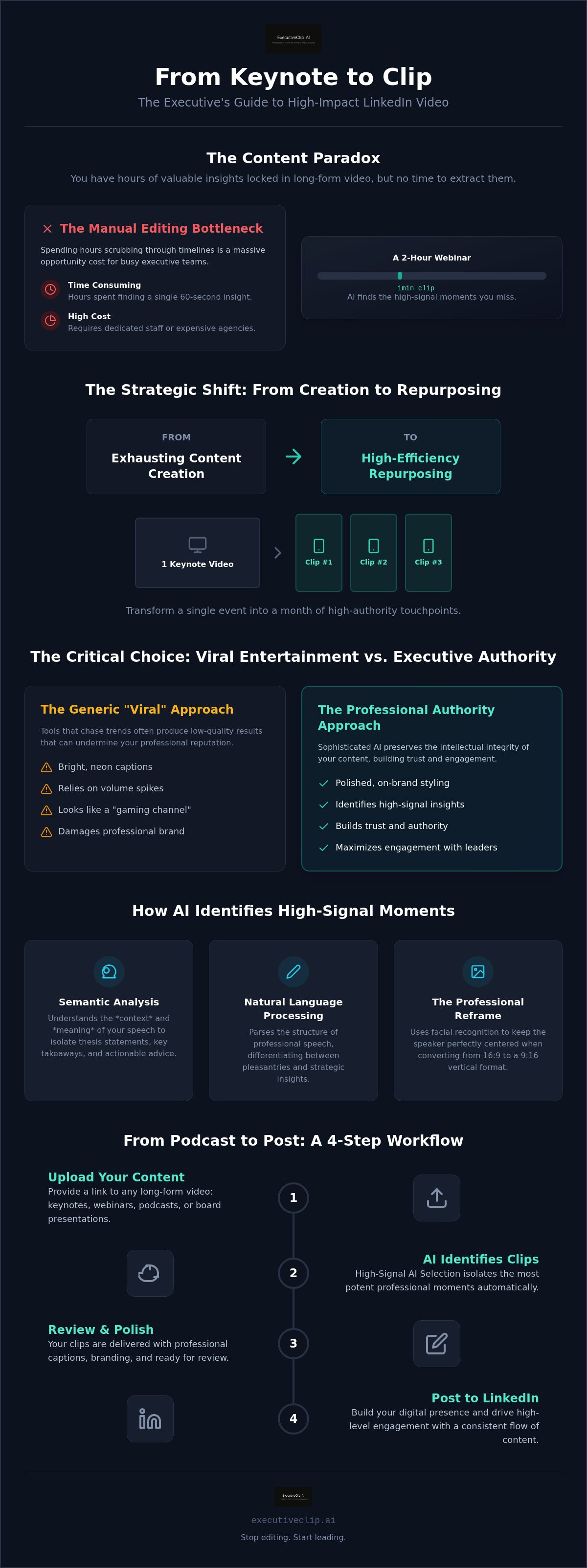
From Podcast to Post: A 4-Step Workflow for High-Impact LinkedIn Clips
Transitioning from a raw recording to a high-impact LinkedIn post requires a methodical progression. This workflow replaces the manual editing grind with a logical system designed for maximum efficiency. By following these four steps, you can ensure that every clip reinforces your professional authority while respecting your schedule.
- Step 1: Curate high-quality source material. Focus on assets like keynotes, podcasts, or webinars where your strategic insights are most concentrated. The goal is to identify sessions where you've already delivered high-value information.
- Step 2: Leverage a professional long video to clips converter. Automated extraction identifies the precise moments where your expertise peaks. This stage follows a direct Action-to-Outcome logic, where the AI handles the heavy lifting of scrubbing through timelines so you don't have to.
- Step 3: Apply the "Executive Polish." This stage involves refining the visual framing and ensuring that captions are technically accurate. It's about aligning the output with your existing corporate identity and professional standards.
- Step 4: Execute strategic distribution. Post your clips natively on LinkedIn to maximize reach. Engaging with the initial comments on your post signals the algorithm to boost your content to a wider professional audience.
Input Optimisation: Garbage In, Garbage Out
Source quality is the foundation of AI success. Clear audio and distinct speaker segments allow the natural language processing agents to accurately parse your message. If the AI can't hear you clearly, it can't identify your best insights. Focus on evergreen topics that sustain LinkedIn authority over time, such as leadership philosophy or industry-wide shifts. This ensures that the clips you generate today remain valuable assets in your content library for months rather than days.
Refining the Output for LinkedIn Professionalism
Visual presentation on LinkedIn requires a specific technical standard. Your clips must utilize a 9:16 aspect ratio that keeps the speaker centered while respecting the platform's user interface constraints. Writing a compelling "hook" for the post is equally important; the text should provide immediate context for the video's insight. A polished executive feed is defined by visual clarity, professional typographic standards, and the absence of distracting, low-quality graphical overlays. To implement this workflow without the overhead of a production team, you can access our AI-powered vertical video conversion tools and start scaling your presence today.
Effortless Mastery: Scaling Your Digital Presence with ExecutiveClip AI
Scaling a professional brand requires more than just high-quality thoughts; it requires a reliable system for distribution. ExecutiveClip AI serves as your digital strategist and silent partner, bridging the gap between raw expertise and market-ready content. By utilizing a specialized long video to clips converter, you move away from the fragmentation of manual processes and toward a unified logic of "Action-to-Outcome." This transformation allows you to maintain a dominant presence in the LinkedIn feed while your primary focus remains on high-level business strategy.
The digital landscape for B2B leaders is shifting toward video-first communication. Those who leverage automated intelligence to curate their insights are already seeing the benefits of increased discovery and authority. Joining the ranks of these leaders doesn't require a production team; it requires a tool built specifically for the nuances of professional branding and executive-level confidence.
Ready-to-Post Precision
The core advantage of automated selection lies in its ability to handle high-volume content needs with surgical precision. Unlike generic tools that prioritize "viral" aesthetics, our platform identifies high-signal moments that resonate with a professional audience. Our subscription model provides predictable costs for content teams, ensuring that your scaling efforts remain sustainable and efficient. This focus on LinkedIn-ready video clips means your content is optimized for the platform's specific engagement patterns from the moment it is generated.
Ready to elevate your digital strategy? Experience the transformation with ExecutiveClip AI and reclaim your time today.
Your Digital Reputation, Optimised
Maintaining a consistent presence on LinkedIn is the most effective way to build long-term trust, yet it's often the first thing to suffer when business demands increase. ExecutiveClip AI eliminates the content creation burnout by turning your existing assets into a recurring source of value. B2B leaders trust our platform because it respects the professional-technical register required for executive branding. It ensures that every clip reflects a polished, refined end product that enhances your digital reputation rather than diluting it with unnecessary flair.
The future of executive communication is dynamic, agile, and automated. As vertical video continues its dominance, the ability to rapidly repurpose long-form insights will separate the most influential leaders from the rest of the field. By choosing a sophisticated partner that understands the specific demands of the LinkedIn ecosystem, you ensure your voice is heard where it matters most. Effortless mastery is no longer a goal; it is a standard you can achieve through strategic automation.
Mastering Your Digital Authority
Scaling your professional influence doesn't require more time on camera; it requires a smarter approach to the assets you already have. By shifting from a mindset of constant creation to strategic repurposing, you reclaim your schedule while maintaining a dominant presence on LinkedIn. You've seen how a specialized long video to clips converter identifies high-signal insights that generic tools often miss. Prioritizing a professional, executive-level finish over viral gimmicks ensures that your digital reputation remains uncompromised as you reach a wider audience.
Transformation is a matter of choosing the right partner to handle the technical complexities of vertical video. With AI-driven content selection and a workflow optimized for LinkedIn engagement, you can achieve effortless mastery of your digital feed. It's time to let your expertise work harder for you. Start transforming your video assets with ExecutiveClip AI and lead the conversation in your industry. Your network is waiting for your next insight.
Frequently Asked Questions
What is a long video to clips converter?
A long video to clips converter is an AI-powered platform that transforms long-form video assets into short, vertical segments. It automates the extraction of key moments from interviews, podcasts, or keynotes. This technology allows professionals to repurpose existing recordings into high-impact social media assets without the need for manual scrubbing through timelines. It's a strategic tool for maintaining a consistent digital presence with minimal effort.
How does AI decide which parts of my video to clip?
The system uses Natural Language Processing to parse professional speech and identify high-signal moments. It distinguishes between introductory filler and core strategic insights by analyzing semantic patterns. The AI looks for thesis statements, actionable advice, and key takeaways that resonate with a professional audience. This ensures that the extracted segments preserve the intellectual integrity of your original presentation while maximizing viewer engagement.
Can I use an AI video clipper for professional LinkedIn content?
You can certainly use an AI clipper, provided the tool is optimized for professional standards rather than just viral trends. A specialized long video to clips converter ensures that the output maintains executive branding and high-quality typographic standards. It delivers polished, ready-to-post vertical clips that align with the professional environment of LinkedIn, avoiding the distracting aesthetics often found in consumer-grade tools.
How long should a LinkedIn video clip be for maximum engagement?
Current trends suggest that short-form clips between 30 and 90 seconds are ideal for discovery on the LinkedIn feed. This duration is sufficient to deliver a single, potent insight without losing the viewer's attention. While longer videos of two to five minutes can work for deep-dive engagement, the shorter format is more effective for stopping the scroll and building initial authority with a busy professional audience.
Is it better to use a general AI clipper or a LinkedIn-specific tool?
A LinkedIn-specific tool is superior for B2B leaders because it respects professional "Safe Zones" and specific branding requirements. General tools often prioritize "viral" aesthetics like neon emojis or loud music, which can undermine executive authority. A dedicated platform focuses on professional polish and technical accuracy, ensuring your content is optimized for the unique engagement patterns of a corporate network.
What kind of long-form video works best for AI clipping?
Content rich in verbal insights works best, such as keynotes, webinars, podcasts, and recorded interviews. Clear audio and distinct speaker segments improve the AI's ability to accurately transcribe and isolate the most impactful moments. Evergreen topics are particularly valuable for this process. They sustain engagement over a longer period and ensure your content library remains a relevant asset for your professional brand.
How much time can an executive save using an AI video converter?
Executives can save several hours of manual effort by automating the content selection and reframing process. Instead of spending a full day scrubbing through a 60-minute webinar, the AI identifies and exports multiple high-quality clips in minutes. This streamlined workflow allows leadership teams to maintain a high-frequency posting schedule while keeping their primary focus on core business strategy and high-level decision-making.
Do I need video editing skills to use ExecutiveClip AI?
No technical video editing skills are required to use the platform. It's designed for effortless mastery, managing the complex tasks of reframing, speaker tracking, and captioning automatically. Users simply upload their long-form assets and receive polished, LinkedIn-ready clips. The system acts as a silent partner, handling the technical production so you can focus on the strategic distribution of your expertise.

