
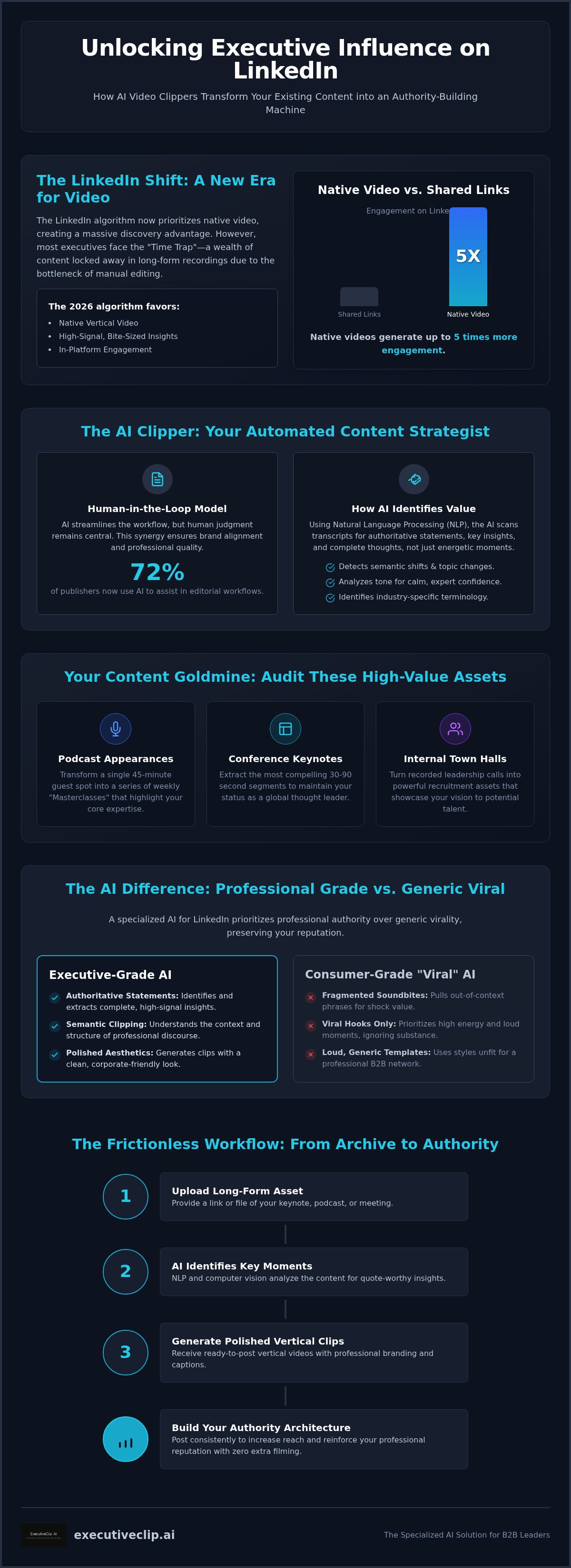
Native videos on LinkedIn currently receive up to five times more engagement than shared links, yet most executives still hesitate to post because professional video production remains a major bottleneck. You likely recognize that your hour-long keynote or podcast contains enough thought leadership to fuel a month of social content, but the prospect of manual editing is exhausting. Traditional social media templates often feel too loud or viral-focused for a corporate profile. Adopting a specialized AI video clipper for LinkedIn is no longer a luxury for the modern leader; it's a strategic necessity to maintain a consistent presence without sacrificing your calendar.
You've already done the hard work of creating the original content. This guide demonstrates how to use an AI video clipper for LinkedIn to surgically extract high-signal insights and transform them into polished, vertical assets. We'll explore the shift toward the human-in-the-loop model, where 72% of publishers now use AI to streamline editorial workflows while keeping human judgment at the center. You'll learn how to build an automated Authority Architecture that increases your reach, preserves your professional reputation, and requires zero additional time in front of a camera.
Key Takeaways
- Understand why the 2026 LinkedIn algorithm prioritizes native vertical video and how this shift provides a significant discovery advantage for executive profiles.
- Discover how a specialized AI video clipper for LinkedIn uses natural language processing to surgically extract high-signal professional insights from your existing podcasts and interviews.
- Learn to distinguish between generic viral templates and the high-authority, polished aesthetics required to maintain a professional reputation on B2B networks.
- Implement a frictionless, automated workflow that converts long-form assets into ready-to-post vertical clips without the need for manual editing or additional filming.
- Transition from passive content storage to active authority architecture by leveraging AI tools designed specifically for professional-grade output and B2B standards.
The Shift to Vertical: Why LinkedIn Video Requires a Specialized AI Strategy
The LinkedIn algorithm in 2026 has fundamentally pivoted toward a vertical-first consumption model. This evolution favors native video over external links, rewarding creators who keep professionals engaged within the platform's dedicated video feed. Modern digital strategy now relies on a sophisticated recommender system that analyzes viewer behavior to surface the most relevant professional insights. For leaders, this means a shift toward "Authority Architecture," where your digital presence is built on a foundation of high-signal, bite-sized content rather than sporadic, long-form uploads that often get buried in the feed.
Most executives are currently sitting on a content goldmine. Dozens of hours of keynote speeches, board presentations, and podcast interviews sit idle in archives. The primary obstacle is the "Executive Time Trap," where the cost of manual editing outweighs the perceived benefit of posting. An AI video clipper for LinkedIn solves this by identifying the most impactful moments in seconds. This allows you to scale your influence without the friction of a traditional production cycle.
The Rise of the 'Short-Form Executive'
Professional engagement patterns have shifted. While long-form webinars provide depth, 60-second insights are the primary vehicle for discovery on LinkedIn. High-quality vertical clips create a psychological sense of "effortless mastery," positioning you as a leader who delivers value with precision. This format respects the limited time of your peers while building the trust necessary to move them toward your longer-form content.
Inventory Analysis: What Content Should You Clip?
You don't need to film new material to dominate your industry feed. Instead, audit your existing video library for these high-value assets:
- Podcast Appearances: Transform a single 45-minute guest spot into a series of weekly "Masterclasses" that highlight your core expertise.
- Conference Keynotes: Extract the most compelling 30-90 second segments to maintain your status as a global thought leader.
- Internal Town Halls: Turn recorded leadership calls into powerful recruitment assets that demonstrate your vision to potential talent.
By using an AI video clipper for LinkedIn, you ensure that your most profound statements aren't lost in a long video that few have the time to watch. This systematic approach ensures your best ideas reach the widest possible audience with minimal effort.
How AI Video Clippers Identify High-Value Professional Moments
AI video clipping is the automated process of using Natural Language Processing (NLP) and computer vision to segment long-form video into concise, high-impact assets. This technology is fundamentally changing how marketers analyze data and video content. For a specialized AI video clipper for LinkedIn, the objective isn't merely to find loud or fast-paced moments. Instead, the algorithm identifies semantic shifts, authoritative statements, and logical conclusions that resonate with a professional audience.
Automated Content Selection in a B2B context relies on identifying "high-signal" moments. While consumer-grade tools often prioritize viral "hooks" or high-energy reactions, executive-grade AI looks for industry-specific terminology and strategic insights. The system analyzes the speaker's cadence and the structural layout of the speech to pinpoint where a new concept begins and ends. This ensures that the resulting clip is a complete, valuable thought rather than a fragmented soundbite.
Natural Language Processing (NLP) in Clipping
The AI understands professional context by mapping industry jargon against vast linguistic databases. Sentiment analysis plays a crucial role here, as it doesn't just look for excitement; it identifies the calm, confident tone of an expert delivering a breakthrough insight. Semantic clipping is the AI-driven extraction of logical narrative units from video, a process that industry leaders report has reached near-human levels of precision in 2026. This allows the tool to find the "quote-worthy" beats that traditional manual editing might overlook.
Visual Reframing and Professional Aesthetics
Once the insight is identified, the AI handles the technical burden of vertical reframing. It uses computer vision to track the speaker's face, ensuring they remain centered in a 9:16 aspect ratio without losing resolution. This automated process replaces hours of manual keyframing that would otherwise be required to keep a moving speaker in the frame.
Professional aesthetics are non-negotiable for leadership content. The AI applies high-contrast, accurate subtitles that allow for muted viewing, which is how the vast majority of LinkedIn users consume video. It ensures that every export maintains corporate brand consistency through refined typography and layout. If you're looking to scale your presence without the overhead of a production crew, ExecutiveClip AI provides the specialized polish required for the B2B ecosystem.
Evaluating AI Clippers: Professionalism vs. General Virality
Selecting the right AI video clipper for LinkedIn requires a fundamental shift in perspective. Most general-purpose tools market a "virality score" as their primary metric. While this is useful for consumer platforms like TikTok or Instagram Reels, it often correlates with high-energy, low-substance content that can undermine executive authority. On LinkedIn, engagement is driven by professional relevance and the perceived value of the insight, not just visual stimulation.
A high virality score on a generic platform might suggest your clip is perfect for a teenage audience, but it rarely accounts for the nuances of B2B communication. Professional standards demand clean typography, precise transcriptions, and subtle visual enhancements. Low-quality "free" tools often impose watermarks or export at low bitrates, which immediately signals a lack of professional polish. These hidden costs can damage your brand more than the savings are worth. Maintaining a high-authority digital presence requires a tool that prioritizes output quality over generic engagement metrics.
The 'Authority Check' for AI Outputs
Technical accuracy is the foundation of digital trust. If an AI tool misinterprets industry-specific terminology or fails to handle complex business acronyms, the speaker's credibility is instantly compromised. You should evaluate platforms based on their ability to support professional-grade caption styles that align with your corporate brand. A streamlined workflow is equally vital. Busy leadership teams don't have the capacity for complex manual adjustments; they need a system that delivers a refined product on the first export. This ensures the tool acts as a silent partner that elevates your reputation rather than creating more work for your communications team.
Feature Comparison: What Actually Drives LinkedIn Engagement?
In 2026, the debate between dynamic and static captions has settled in favor of readability. While dynamic, moving text can capture initial attention, static or subtle captions often perform better for educational content where the reader needs to absorb complex information. Your AI video clipper for LinkedIn should also generate hooks tailored for professional curiosity. Instead of sensationalist clickbait, effective LinkedIn hooks frame the video as a solution to a specific industry challenge.
Integration is the final piece of the productivity puzzle. A truly executive-ready platform connects seamlessly with your existing recording stack, whether you use Zoom for internal town halls or Riverside for high-fidelity podcasts. This frictionless connectivity ensures that your content pipeline remains active without requiring additional administrative oversight or manual file transfers.
Workflow Guide: From Raw Video to LinkedIn Authority
Transforming high-fidelity recordings into a month of professional content shouldn't be a manual burden. A structured workflow ensures that every output maintains executive standards while maximizing the efficiency of your AI video clipper for LinkedIn. Moving from a raw asset to a polished post requires a logical progression from selection to scheduling.
- Step 1: Uploading High-Signal Assets. Start with long-form recordings such as keynote speeches, podcast guest spots, or internal town halls where your most impactful insights are already captured.
- Step 2: Configuring AI Parameters. Set your preferences for professional tone, LinkedIn-specific aspect ratios, and brand-aligned typography to ensure the output matches your digital identity.
- Step 3: Strategic Review. Briefly evaluate the AI-selected segments to confirm they align with your current leadership objectives and corporate messaging.
- Step 4: Hook and Caption Finalization. Refine the automated transcriptions and add a compelling headline that frames the insight for a business audience.
- Step 5: Strategic Scheduling. Deploy your clips during peak B2B engagement windows, typically Tuesday through Thursday mornings, to maximize reach within your professional network.
Optimizing the 'First Five Seconds'
The initial moments of your clip determine its success. Use the AI to identify and place your strongest "insight hook" at the very beginning of the video. Visual cues, such as a clear speaker focus and high-contrast professional subtitles, signal to the scroller that the content is worth their time. In 2026, the three-second rule for LinkedIn video retention dictates that viewers decide whether to engage based almost entirely on the immediate clarity of the value proposition. Avoid long introductions; start with the conclusion or a provocative industry observation to secure immediate attention.
Managing the Feedback Loop
Efficiency increases when you refine your process based on performance data. Review which types of clips generate the highest quality engagement and adjust your AI parameters to favor those formats in future batches. This iterative approach allows you to maintain a consistent "Expert Facilitator" voice across all communications. Scaling production becomes frictionless once the system understands your preferences. A single hour of video can easily yield twelve to fifteen high-authority clips, providing a full month of consistent LinkedIn presence with minimal additional oversight. To begin automating your professional brand growth, you can start using ExecutiveClip AI today to turn your existing video assets into high-performance LinkedIn content.
ExecutiveClip AI: The Specialized Solution for B2B Leaders
ExecutiveClip AI functions as a high-end digital strategist for professionals who value their time and digital reputation. Unlike generic tools designed for broad social media appeal, our AI video clipper for LinkedIn is engineered specifically for the corporate utility of the B2B ecosystem. It eliminates the friction of manual production by identifying and polishing the high-signal moments that define thought leadership. This approach ensures your content reflects the precision of a high-end business consultant rather than a casual creator.
Built for Professional Reputation
Our algorithm understands the specific nuance of executive speech, recognizing that a leader's credibility depends on context and clarity. While standard clippers often prioritize rapid-fire cuts and loud graphics to trigger viral engagement, ExecutiveClip AI focuses on the professional-technical register. This ensures that every LinkedIn-ready video clip maintains your gravitas and authority. The platform prioritizes professional polish because we understand that a single misaligned post can damage years of reputation building. Our AI analyzes the semantic structure of your speech to ensure the logic of your argument remains intact during the transition to vertical video.
The ROI of automated content selection is measurable in both time and reach. Since native videos on LinkedIn receive up to five times more engagement than shared links, using a dedicated AI video clipper for LinkedIn directly impacts your digital visibility. Marketers report saving an average of 6.1 hours per week by using AI for content creation, allowing leaders to maintain a high-frequency presence without increasing their filming time. This "Effortless Mastery" allows you to transform your archive into a continuous engine for professional growth while maintaining a high formality register.
Getting Started with ExecutiveClip AI
Integrating the platform into your current digital strategy is a straightforward and logical process. We offer subscription tiers designed to match varying content volumes, from individual leaders building a personal brand to full executive teams scaling their corporate presence. Each tier provides access to our specialized LinkedIn formatting and automated selection tools, ensuring a modular flow that respects your limited time. The system connects seamlessly with your existing recording workflows, allowing for a frictionless transition from raw file to published authority. You can transform your long-form video into LinkedIn authority today by leveraging a tool built for the refined standards of global leadership.
Building Your Authority Architecture for 2026
The shift toward native vertical video on LinkedIn represents a significant opportunity for leaders to scale their influence through precision and consistency. You don't need more filming hours to dominate your industry feed; you need a more efficient way to unlock the value already stored in your long-form recordings. This strategic repurposing is the foundation of a modern digital reputation that stays ahead of the algorithm.
Using a specialized AI video clipper for LinkedIn allows you to maintain a high-authority presence while focusing on your core leadership responsibilities. This technology provides automated vertical conversion and content selection that respects professional standards, ensuring your brand remains polished and refined. It acts as the silent partner your communication strategy requires to thrive in a video-first ecosystem.
It's time to move beyond the limitations of manual editing and embrace a workflow built for the modern executive. Start your executive content transformation with ExecutiveClip AI and join the global B2B leaders who are already redefining digital mastery. Your expertise deserves a platform that matches your professional standards.
Frequently Asked Questions
Is an AI video clipper better than a human editor for LinkedIn?
An AI video clipper for LinkedIn offers superior efficiency and speed compared to manual editing. While human editors provide creative nuance, AI tools specialize in surgical extraction of insights at a fraction of the time and cost. For busy executives, the ability to generate a month of content in minutes provides a scalability that human workflows cannot match. This automated approach ensures your professional standards are met consistently without logistical delays.
What is the ideal length for a LinkedIn video clip in 2026?
The optimal duration for a LinkedIn video clip in 2026 is between 30 and 90 seconds. This window balances the platform's preference for short-form discovery with the need to deliver substantive professional value. While the algorithm supports longer videos, engagement data suggests that concise, high-signal insights perform best for capturing the attention of a scrolling executive audience. Shorter clips are ideal for discovery, while longer segments are better suited for established followers.
Can AI really identify the most important parts of a complex business talk?
Modern Natural Language Processing (NLP) allows AI to identify semantic shifts and authoritative conclusions with high precision. The technology analyzes cadence, industry-specific terminology, and logical narrative units to extract complete thoughts rather than fragmented soundbites. This ensures that complex strategic insights remain intact. By recognizing the structural layout of professional speech, the system pinpoints the most impactful moments that resonate with a B2B audience, replacing the need for tedious manual review.
How do I ensure my AI-clipped videos don't look 'automated'?
Maintaining a professional aesthetic requires using a tool that prioritizes refined output over generic viral templates. You should select an AI video clipper for LinkedIn that offers customizable, high-contrast subtitles and automated vertical reframing that keeps the speaker centered. These features ensure the final asset looks like a bespoke production. By aligning typography and layouts with your corporate brand, you create a polished digital presence that signals authority rather than simple automation.
Does LinkedIn penalize AI-generated or AI-edited video content?
LinkedIn does not penalize content edited with AI; instead, the algorithm rewards native video that generates high engagement. The platform prioritizes educational value and professional relevance regardless of the production method. Using AI to optimize your existing assets for a vertical feed actually improves your visibility and reach. As long as the content provides genuine insight and adheres to professional standards, the use of automated tools is a recognized strategy for maintaining a consistent presence.
What video formats work best for LinkedIn vertical video?
The most effective format for LinkedIn vertical video is an MP4 file using H.264 video and AAC audio. You should target a 9:16 aspect ratio for full-screen placements or a 4:5 ratio for feed-specific videos. These specifications ensure your content displays correctly across mobile devices, where the majority of video consumption occurs. High-resolution exports up to 4096x2304 are supported, though keeping file sizes under 500 MB is recommended for optimal upload performance.
How much time can an executive actually save by using an AI clipper?
Marketers and professionals report saving an average of 6.1 hours per week by incorporating AI into their content creation process. For an executive, this translates to a frictionless transition from a single one-hour recording to a full month of social media assets. By automating the content selection and vertical conversion steps, you eliminate the need for time-consuming feedback loops with human editors. This efficiency allows you to maintain a consistent digital presence with minimal personal oversight.
Can I use AI to add professional subtitles in multiple languages?
Specialized AI tools offer the capability to generate accurate subtitles in multiple languages, significantly expanding your global reach. This feature is essential for international leaders who need to communicate across various markets simultaneously. The AI handles the transcription and translation process automatically, ensuring that technical business terminology remains accurate in every version. Providing localized captions allows your insights to resonate with a diverse professional audience while maintaining the authoritative tone of the original recording.
